Warning: count(): Parameter must be an array or an object that implements Countable in /home3/mrfree74/public_html/touchmic.com/wp-includes/class-wp-comment-query.php on line 405
Warning: count(): Parameter must be an array or an object that implements Countable in /home3/mrfree74/public_html/touchmic.com/wp-includes/class-wp-comment-query.php on line 405
http://touchmic.com/staraoke-the-new-kids-sing-along-karaoke-game-hits-the-app-store/#respond
 Every now and then a really cool mic-enabled app comes along that we feel we people should know about. In this case the app is called Staraoke, and if you are a parent of a child who loves to sing (or would like to start) then Staraoke should be on your list of downloads for your iPhone or iPad.
Staraoke is a unique and non-violent iPhone/iPad-game that combines three things kids love: singing, games and friends! Staraoke was originally a Karaoke PC game that became a hit television show. It is available now in both iPhone and iPad versions.
Initially Staraoke comes pre-loaded with 3 traditional German kids songs: Itsy Bitsy Spider, Brother John and Old MacDonald. (More songs will come soon in future free upgrades.)
Targeted at elementary school age children Staraoke lets children control a cartoon character on their screen by singing along to various songs. The software recognizes the singer’s pitch and keeps the character on the path unless you sing off key. Children will quickly develop their singing ability to win as many points as possible. “Children love computer games and singing. Staraoke combines these things and you can even learn to sing with the game, says Antti Seppänen, CEO of Intervisio.
Check out the gameplay:
Special treat for owners of “Staraoke” from TouchMic.com!
Within the app there is also a special treat from TouchMic.com. To download the app and find out more you can purchase the app from iTunes at the below links:
For iPhone Users:
For iPad Users:
]]>Warning: count(): Parameter must be an array or an object that implements Countable in /home3/mrfree74/public_html/touchmic.com/wp-includes/class-wp-comment-query.php on line 405
Warning: count(): Parameter must be an array or an object that implements Countable in /home3/mrfree74/public_html/touchmic.com/wp-includes/class-wp-comment-query.php on line 405
0
Warning: count(): Parameter must be an array or an object that implements Countable in /home3/mrfree74/public_html/touchmic.com/wp-includes/class-wp-comment-query.php on line 405
Warning: count(): Parameter must be an array or an object that implements Countable in /home3/mrfree74/public_html/touchmic.com/wp-includes/class-wp-comment-query.php on line 405
http://touchmic.com/need-an-ipad-microphone-top-4-reasons-for-an-external-ipad-mic/#respond
Here are the top 4 cases when an external TouchMic iPad mic would come in handy:
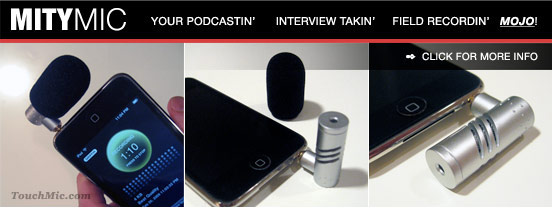
1. Using VoIP telephony apps such as Skype & Line2
Yes, you can use your iPad mic and on-board speaker for placing phone calls over the Internet with your iPad, but it isn’t optimal. If you don’t want others in the vicinity to hear your conversation or if you are in a loud environment, you may want to consider investing in a good headset with integrated mic, or a TouchMic Lapel Mic and Adapter, Both serve as great iPad Microphones for VoIP apps.
2. Recording a telephone conversation or conference call with your iPad
Our Telephone Conversation Recording Microphone will allow you to use your iPad to record important telephone conversations and conference calls you conduct over your regular cell phone or any land line phone.
3. Outdoor interviews or recordings
If you find yourself recording in windy outdoor areas, you may want to check out our MityMic, which comes fitted with a windscreen – perfect for outdoor recording.
4. Use any third party microphone not intended for use with Apple products (i.e. a hand held mic)
Our Third Party Mic & Adapter Cable will allow you to interface almost any sort of third party mic with a 3.5mm jack and make it into an iPad Microphone.
We hope you found this post helpful. If you have any questions or comments please let us know. Add your comment to the post or drop us an email at Support@TouchMic.com.
Enjoy your iPads folks!
]]>Warning: count(): Parameter must be an array or an object that implements Countable in /home3/mrfree74/public_html/touchmic.com/wp-includes/class-wp-comment-query.php on line 405
Warning: count(): Parameter must be an array or an object that implements Countable in /home3/mrfree74/public_html/touchmic.com/wp-includes/class-wp-comment-query.php on line 405
0
Warning: count(): Parameter must be an array or an object that implements Countable in /home3/mrfree74/public_html/touchmic.com/wp-includes/class-wp-comment-query.php on line 405
Warning: count(): Parameter must be an array or an object that implements Countable in /home3/mrfree74/public_html/touchmic.com/wp-includes/class-wp-comment-query.php on line 405
http://touchmic.com/ipod-touch-1g-upgrade-311-disables-mic-ivoiceiii-ivoicepro/#comments
Do not upgrade your firmware to 3.1.1 unless you are OK with losing the functionality of iVoice III or iVoice Pro microphone. We can confirm that these mics remain functional up to software version 3.0, but the 3.1.1 upgrade disables the mics.
If you have not upgraded, we recommend to hold off until 3.1.2, where Apple will probably issue a fix. If you have already upgraded, and the mic function is more important to you than the functions in the 3.1.1 upgrade, then you should roll back your firmware version.
We cannot offer any official support on how to roll back your iPod Touch firmware to 2.2.1, however there is a lot of information out on the web. Some good places to research are the Apple forums, particularly this post about rolling back firmware. (Even though it is outdated, the methods can point you in the right direction.)
Also you can check out the YouTube video below from “EMAC” regarding how to roll back 3.0/3.1.1 firmware back to 2.2.1 on iPod Touch:
Note that the iPod Touch 3.1 firmware upgrade DOES NOT affect mics plugged into the 3.5mm jack on iPod Touch 2g & 3G.
Subscribe to our RSS feed to stay updated on iPod Touch/iPhone news and future news and updates.
Cheers! – TouchMic.com
]]>Warning: count(): Parameter must be an array or an object that implements Countable in /home3/mrfree74/public_html/touchmic.com/wp-includes/class-wp-comment-query.php on line 405
Warning: count(): Parameter must be an array or an object that implements Countable in /home3/mrfree74/public_html/touchmic.com/wp-includes/class-wp-comment-query.php on line 405
20
Warning: count(): Parameter must be an array or an object that implements Countable in /home3/mrfree74/public_html/touchmic.com/wp-includes/class-wp-comment-query.php on line 405
Warning: count(): Parameter must be an array or an object that implements Countable in /home3/mrfree74/public_html/touchmic.com/wp-includes/class-wp-comment-query.php on line 405
http://touchmic.com/skype-for-ipod-touch-and-iphone-voip-finally/#comments
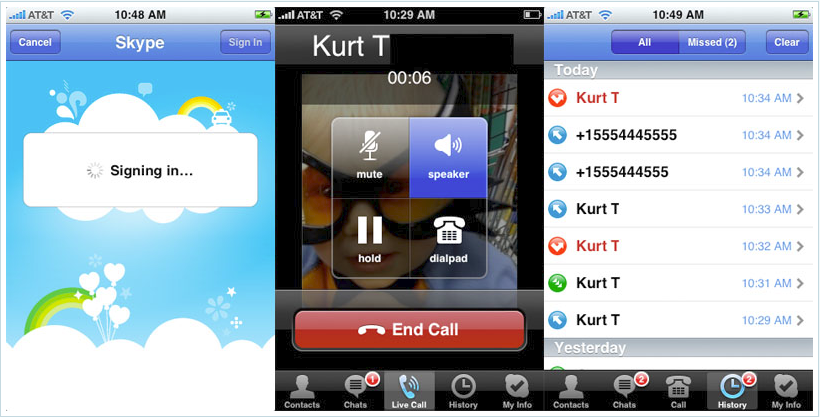
Now one may ask why will the official Skype app be any better or different than Fring or Truphone? Skype claims their edge to be less server latency and better overall sound quality. Well we at TouchMic.com are excited to try out the new app with our mics and will be posting some videos and reviews soon.
In the meanwhile here is a screenshot of the upcoming Skype app taken from Gizmodo.com:
If you need a mic for your iPod Touch or iPhone feel free to browse our product list as we have many mic solutions. Until next time…
-TouchMic.com
]]>Warning: count(): Parameter must be an array or an object that implements Countable in /home3/mrfree74/public_html/touchmic.com/wp-includes/class-wp-comment-query.php on line 405
Warning: count(): Parameter must be an array or an object that implements Countable in /home3/mrfree74/public_html/touchmic.com/wp-includes/class-wp-comment-query.php on line 405
2
Warning: count(): Parameter must be an array or an object that implements Countable in /home3/mrfree74/public_html/touchmic.com/wp-includes/class-wp-comment-query.php on line 405
Warning: count(): Parameter must be an array or an object that implements Countable in /home3/mrfree74/public_html/touchmic.com/wp-includes/class-wp-comment-query.php on line 405
http://touchmic.com/top-ipod-touch-recording-app-voxie-not-italk/#comments
You guys are using your iPod Touch microphones in all kinds of imaginative ways. From guerilla journalists conducting recorded interviews in the field, to grade school girls recording their singing rehearsals, to academics recording lectures, the list goes on! We even had a gentleman inquire about using our mic as a hearing aid (don’t ask, that interesting story is for another blog post!).
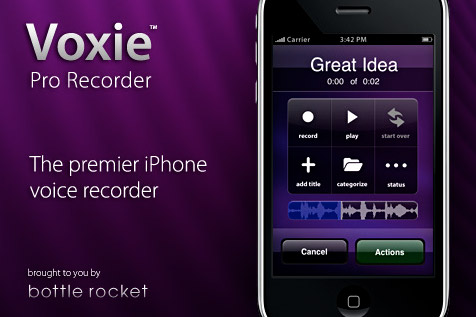
In any case, we are often asked to recommend a good voice recording app. Well after testing the top two apps available on the app store for recording – “iTalk Recorder Premium” and “Voxie” – we think that Voxie takes the cake!
Why we chose Voxie
Both apps have nice features too long to list here, so we want to cut to the chase and tell you the 4 reasons why we think Voxie stands out :
- Quality – In our testing the Voxie recording had less background noise and better pickup than the iTalk app.
- User Interface – Both apps look great, but Voxie’s takes the cake by using the familiar and effective iPhone style interface along with a beautiful choice of skins.
- Features – Voxie is the only recording app you should ever need.
- Price – At $1.99 it comes in $3 cheaper than iTalk Recorder Premium.
We recently featured Voxie in a video with our TouchMic Lapel Mic:
Relevant Links:
- You can purchase the lapel mic right here at TouchMic.com
- To find out more about the makers of Voxie go to www.bottlerocketapps.com
- Voxie is compatible with iPod Touch and iPhone, to download click here
- Please comment and subscribe to our RSS feed.
Warning: count(): Parameter must be an array or an object that implements Countable in /home3/mrfree74/public_html/touchmic.com/wp-includes/class-wp-comment-query.php on line 405
Warning: count(): Parameter must be an array or an object that implements Countable in /home3/mrfree74/public_html/touchmic.com/wp-includes/class-wp-comment-query.php on line 405
6
Warning: count(): Parameter must be an array or an object that implements Countable in /home3/mrfree74/public_html/touchmic.com/wp-includes/class-wp-comment-query.php on line 405
Warning: count(): Parameter must be an array or an object that implements Countable in /home3/mrfree74/public_html/touchmic.com/wp-includes/class-wp-comment-query.php on line 405
http://touchmic.com/ipod-touch-microphone-touchmiccom-fring-demo/#respond
Warning: count(): Parameter must be an array or an object that implements Countable in /home3/mrfree74/public_html/touchmic.com/wp-includes/class-wp-comment-query.php on line 405
Warning: count(): Parameter must be an array or an object that implements Countable in /home3/mrfree74/public_html/touchmic.com/wp-includes/class-wp-comment-query.php on line 405
0
Warning: count(): Parameter must be an array or an object that implements Countable in /home3/mrfree74/public_html/touchmic.com/wp-includes/class-wp-comment-query.php on line 405
Warning: count(): Parameter must be an array or an object that implements Countable in /home3/mrfree74/public_html/touchmic.com/wp-includes/class-wp-comment-query.php on line 405
http://touchmic.com/youtube-voip-tutorial-for-ipod-touch-microphone-post-1/#respond
Please note that we do not offer any support at touchmic.com for the microphone or software:
PART 1
PART 2
Warning: count(): Parameter must be an array or an object that implements Countable in /home3/mrfree74/public_html/touchmic.com/wp-includes/class-wp-comment-query.php on line 405
Warning: count(): Parameter must be an array or an object that implements Countable in /home3/mrfree74/public_html/touchmic.com/wp-includes/class-wp-comment-query.php on line 405
0